
Frictionless Security: Integrating Tools into the Developer Workflow
Summary
Developer Experience (DevEx) is key when choosing security tools. Security should make the developer’s job easier, not harder. If developers have to leave their coding environment or use another dashboard to find issues, it slows them down and makes them less likely to use the tools.
To implement security tools the “right way,” you must integrate them directly into the native developer workflow, turning security from a roadblock into a seamless guardrail.
This guide explains how to set up frictionless security. It covers where to put tools like in the IDE, pre-commit hooks, or CI/CD, and how to set them up so your team can work better, not slower.
1. The “Shift Left” Reality: Meeting Developers Where They Live
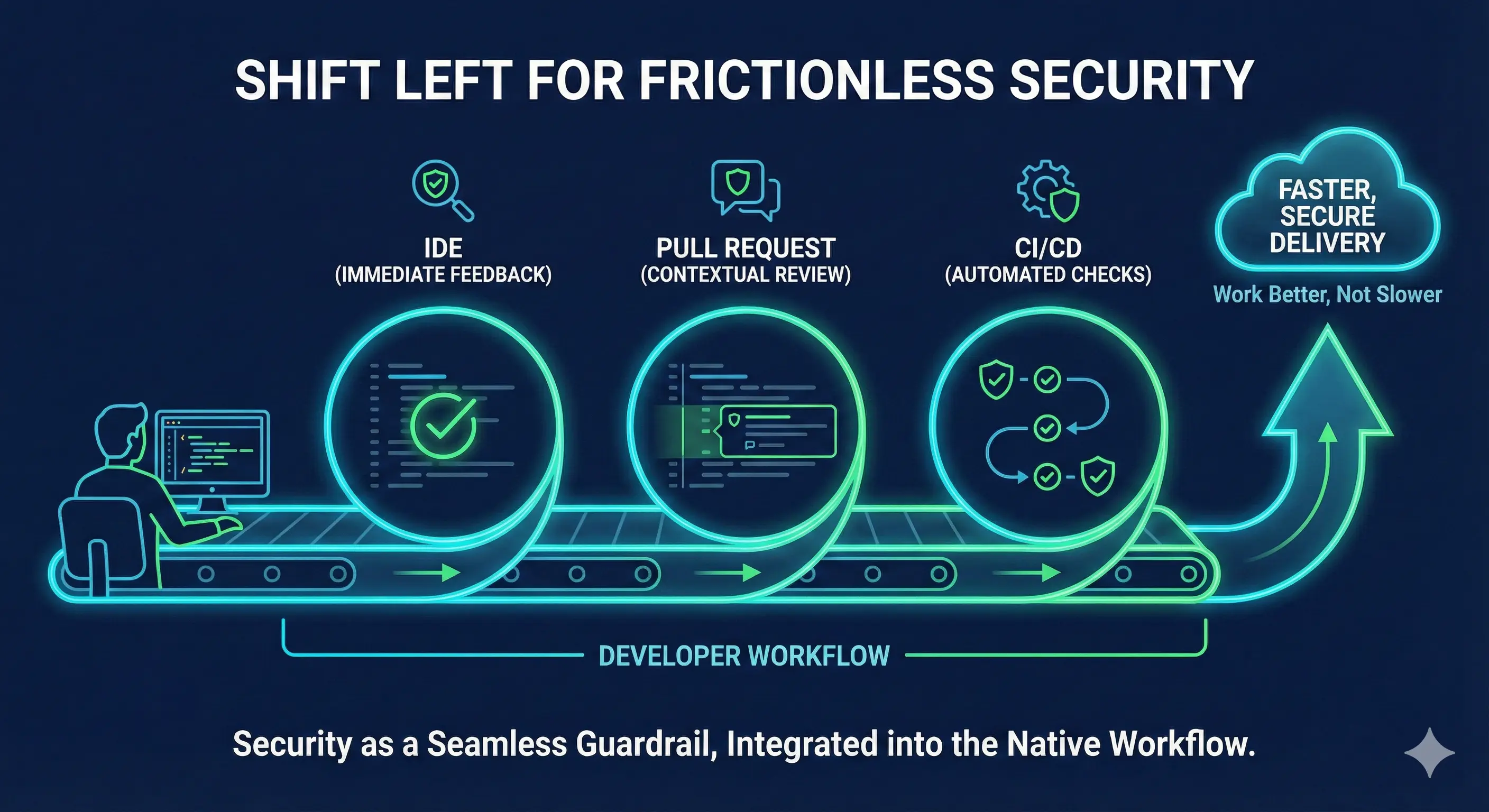
The core principle of friction reduction is context. You must provide security feedback while the developer is still mentally engaged with the code they just wrote. We categorize integration points by their distance from the code creation moment.
A. The IDE
Before code is even saved or committed, security tools should be running locally.
- Tool Types:Static Analysis (SAST) linters, Dependency checkers, Secret scanners.
- Implementation: Install plugins for VS Code, IntelliJ, or Eclipse
- Why It Works: This acts like a spell-checker. Just as a word processor underlines a typo in red immediately, an IDE plugin highlights insecure code (such as hardcoded secrets or unsafe functions) instantly.
B. The Pull Request
The optimal time for feedback is when a developer submits code for review, as they are already focused on quality and open to critique.
Tool Types
Deep SAST, Secret Scanning, and Infrastructure as Code (IaC) scanning.
Implementation
Configure your tools to post inline comments directly on the relevant lines of code in the pull request. This means the security tool posts a comment directly on the specific line of code that failed, just like a human reviewer would.
Why It Works
It keeps the developer in their platform of choice (GitHub, GitLab, Azure DevOps). They don’t need to leave the page to see the error, understand the risk, and push a fix.
2. Speed Matters: Blocking vs. Non-Blocking Scans
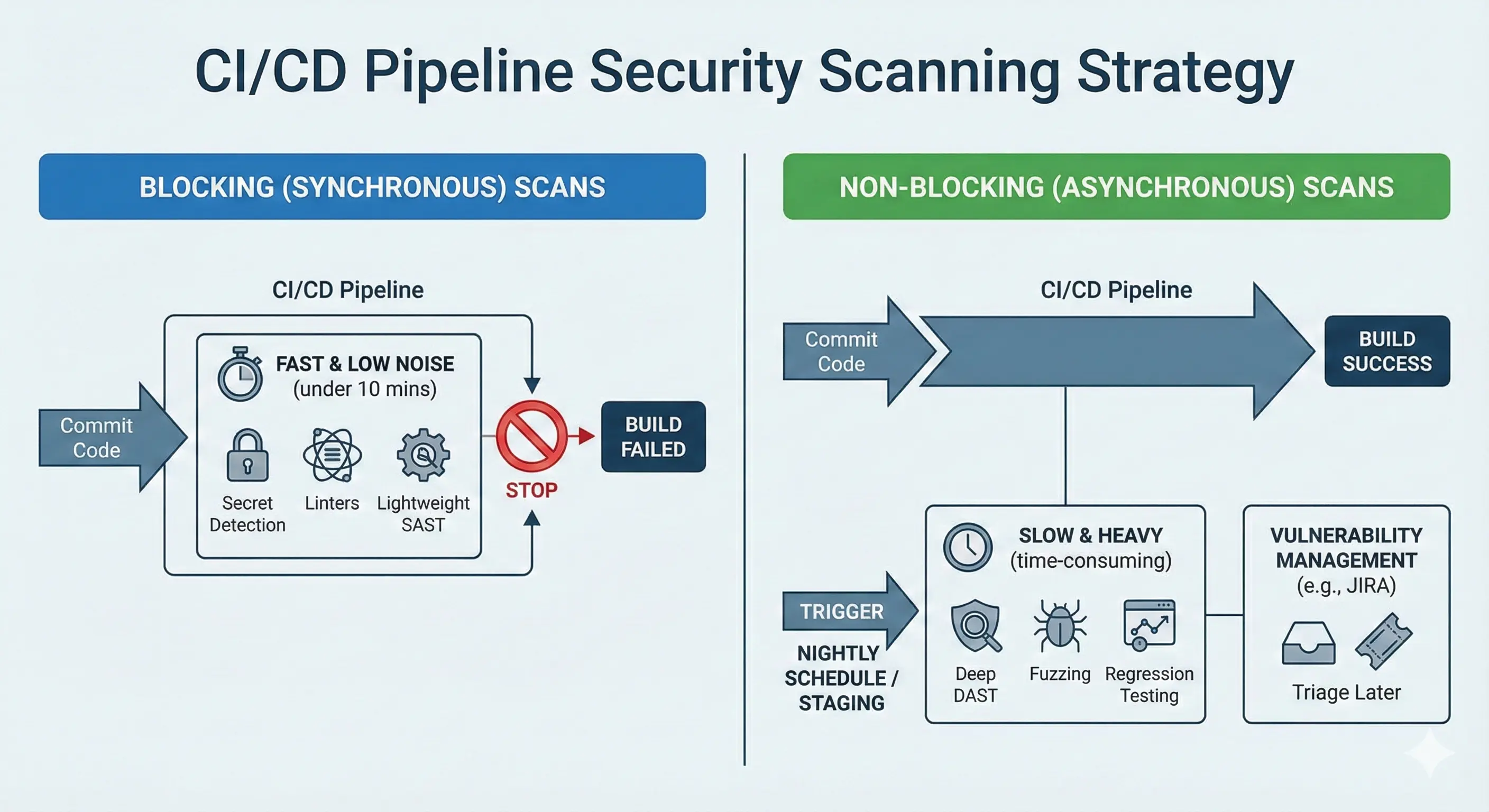
Slow builds significantly degrade developer experience and can lead to security tool bypass. If your security scan adds 20 minutes to a pipeline, developers will actively try to bypass it. You must bifurcate your scanning strategy based on speed.
A. Synchronous (Blocking) Scans
These scans run inside the pipeline and can fail the build. They must be fast (under 5-10 minutes).
What to Run
Secret detection, linters, lightweight SAST, and policy checks.
The Rule
If the scan is fast and deterministic (low false positives), make it blocking. This prevents new simple errors from entering the codebase.
B. Asynchronous (Non-Blocking) Scans
These scans are heavy, time-consuming, or prone to noise. They should never block a standard Pull Request.
What to Run
Deep DAST scans, Fuzzing, or comprehensive regression testing.
The Strategy
Trigger these scans on a schedule (e.g., nightly) or on a dedicated staging environment.
The Feedback Loop
Do not break the build. Instead, pipe the results into a vulnerability management system or create a Jira ticket for the team to triage later. This balances thoroughness with velocity.
3. Moving Beyond Detection to One-Click Remediation
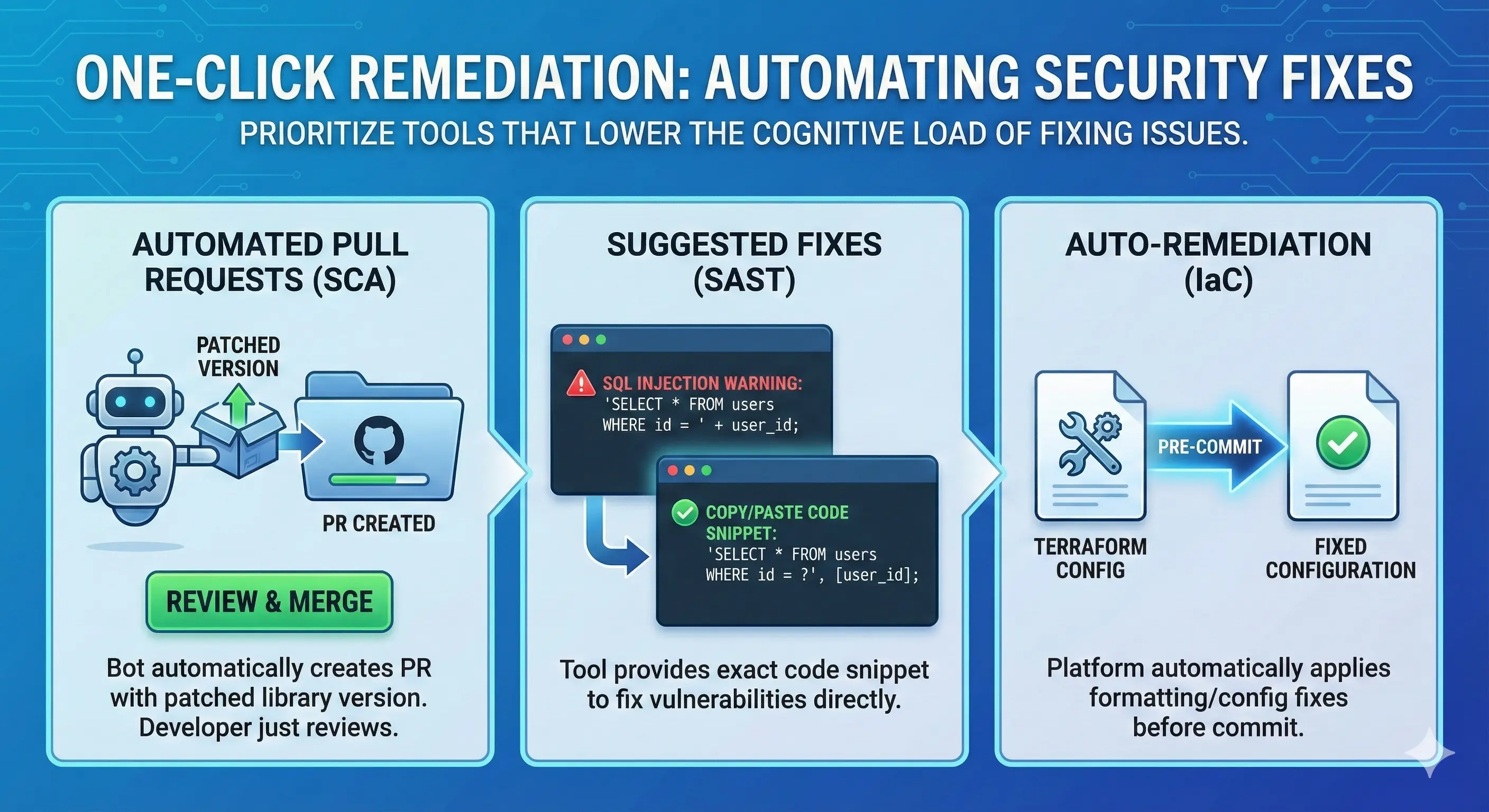
The best security tools not only identify problems but also provide actionable remediation guidance. To reduce friction, prioritize tools that lower the cognitive load of fixing the issue.
Automated Pull Requests
For dependency updates (SCA), use tools like Plexicus ASPM. This tool automatically open a PR with the patched version of the library. The developer only needs to review and merge.
Suggested Fixes
Ensure your SAST tool provides a “Copy/Paste” code snippet for the fix. If a developer sees a SQL Injection warning, the tool should show them the exact parameterized query code to use instead.
Auto-Remediation
Some advanced platforms like Plexicus ASPM can automatically apply formatting or configuration fixes to IaC templates (like Terraform) before the code is even committed.
The Right Way vs. The Wrong Way
| Feature | The Wrong Way (High Friction) | The Right Way (Frictionless) |
|---|---|---|
| Feedback Location | Separate Security Portal or Email Notification | IDE Plugin & Pull Request Comment |
| Timing | 24 hours later (Nightly Scan) | Instant (Pre-commit / CI) |
| Scan Speed | Blocks build for >20 mins | Fast checks block; slow checks are async |
| Remediation | ”Fix this Vulnerability” (Generic) | “Here is the code snippet to fix it” |
| Developer Action | Context switch & investigation | In-flow correction |
Frequently Asked Questions (FAQ)
Q: Will adding IDE plugins impact system performance?
Modern security plugins are designed to minimize resource usage and typically scan only active files to reduce performance impact. However, it’s best to configure them to scan only the active files you are working on, rather than the entire project, to save resources.
Q: What if a blocking scan finds a false positive?
You must have a “Break Glass” or “Risk Acceptance” process. Allow developers to snooze or dismiss an alert with a required comment (e.g., “This is test data, not a real secret”). Review these dismissals later, but don’t stop the build today.
Q: Should we scan every commit?
Ideally, yes, for lightweight checks. For heavier scans, scanning on the Pull Request creation is usually sufficient and saves compute resources compared to scanning every individual commit pushed to a branch.