

SAST vs DAST: What’s the Difference & Why You Should Use Both
Summary
- SAST (Static Application Security Testing) checks your source code, dependencies, and binaries before the application runs.
- DAST (Dynamic Application Security Testing) analyzes your app while it is running to simulate real attacks, such as SQL injection, XSS, or authentication problems.
- The main difference between SAST and DAST
- SAST = inside the code (developer-side)
- DAST = outside the code (attacker-side)
- Best practice: Use both security testing methods or a unified AppSec workflow, such as those in ASPM platforms, to cover the full software development lifecycle from code to cloud.
- Popular tools: Plexicus, Checkmarx, OWASP ZAP, and Burp Suite.
SAST and DAST are security testing methods used to protect applications from attacks. To see how each one helps with application security, let’s look at their differences and where they fit in your workflow.
Each testing method finds vulnerabilities in a different way. One checks the code, while the other tests a running app. Knowing the differences between SAST and DAST is key to building a secure application.
In this article, you’ll learn:
- What SAST and DAST are
- Where and when to use each
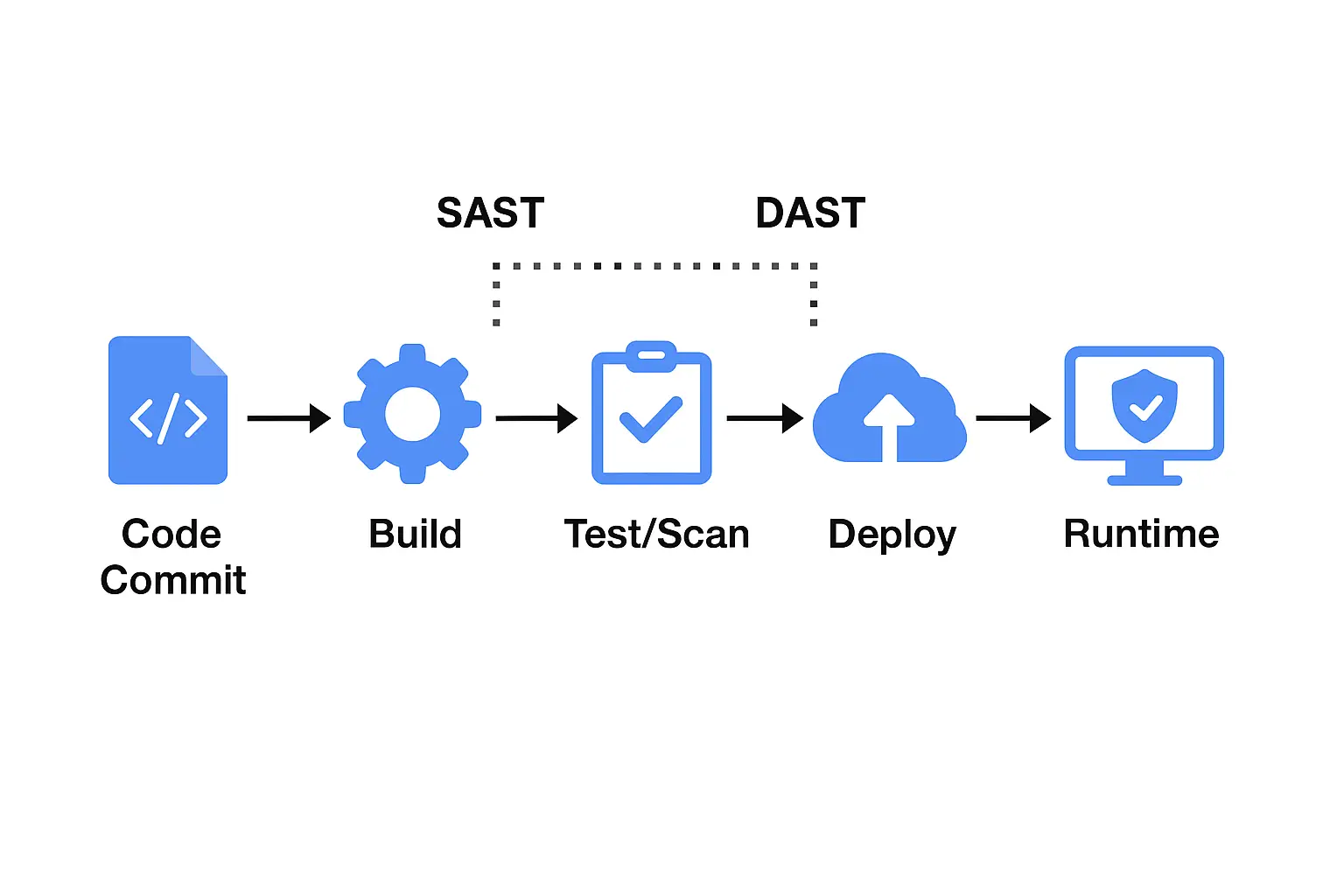
- A clear diagram of how they fit in the SDLC
- The best tools for each method
- How to combine them for full coverage
What is SAST (Static Application Security Testing)?
SAST is also called white-box testing, the security testing approach that analyses source code, binaries, or bytecode to catch vulnerabilities without executing the application. Think of it as performing an inspection inside the blueprint of your app.
How it works
- Developer commits code → SAST tool scans it (IDE, CI pipeline)
- SAST tool flags issues such as hard-coded credentials, SQL injection, and insecure API usage
- Team remediates issues early, before deployment.
Pros
- Finds vulnerabilities early in development when the remediation cost is lowest
- Integrates into dev workflows (IDE, CI) for immediate feedback
Cons
- Language and framework dependent
- May produce false positives compared to runtime tests
- Does not see runtime/environment-specific issues
Best use case
Use SAST as part of a “shift-left” strategy: scanning code at commit/build time instead of threat as a final test before deployment. This approach will help you to catch bugs early.
What is DAST (Dynamic Application Security Testing) ?
DAST, also called as black-box testing, is a method that scans your application while it’s running, simulating a real attack from an attacker’s perspective to identify vulnerabilities visible during execution.
How it works
- A deployed/test environment runs the application.
- DAST tool sends HTTP/API requests, manipulates inputs, and simulates attacks
- Identifies issues such as broken authentication, XSS, exposed APIs, or misconfigurations
Pros
- Technology-agnostic (works across languages and frameworks)
- Finds runtime and environment-specific vulnerabilities
Cons
- Can miss issues deep in code logic
- Later in SDLC, so remediation cost is higher.
Best use case
Use DAST during testing/pre-production or continuously in production for run-time security validation.
How Widely are SAST and DAST used by DevOps teams ?
Based on GitLab’s Global DevSecOps Survey, about 53% dev teams run SAST scans and 55% run DAST scans.
SAST vs DAST: The Key Differences
Here is a clear comparison to help you see how each testing method differs and also complements the other:
| Feature | SAST | DAST |
|---|---|---|
| Type of testing | White-box (code inside) | Black-box (running application) |
| When | Early in SDLC (code commit/build) | Later in SDLC (test/runtime) |
| What it scans | Source code, binaries, bytecode | Live application, APIs, endpoints |
| Language/framework dependence | High | Low |
| Detects | Code-level flaws | Runtime, misconfiguration, auth issues |
| False positives | Higher | Lower (better context) |
| Integration point | IDE, CI, build pipeline | Test environment or production |
Why Use Both SAST and DAST?
SAST and DAST together will fill each other’s gaps :
- SAST catches vulnerabilities early in code (cheaper fixes)
- DAST validates runtime behaviour and catches what SAST cannot
For example, SAST might not detect a SQL injection flaw in code, but DAST might detect that the flaw is actually exploitable in the live app.
By combining both, you get coverage code to the runtime. Make the application stronger.
This simple flow shows where SAST and DAST fit.
SAST vs DAST Tools
Here are the top tools you should consider:
Tool Comparison Table
| Tool | Type | Highlights |
|---|---|---|
| Plexicus | SAST + DAST | Unified platform; code + runtime + remediation |
| Checkmarx One | SAST | Enterprise code analysis |
| OWASP ZAP | DAST | Open-source web application scanner |
| Burp Suite | DAST | Pen-testing toolkit with active scan |
| SonarQube | SAST | Code quality + security rules |
| Veracode | SAST + DAST | Cloud-based scanning with policy engine |
| GitLab Security Scans | SAST + DAST | Integrated CI/CD security scans |
Check also the best SAST tools and DAST tools available in the market.
Best Practices: SAST + DAST Workflow
- Integrate SAST as early as possible in CI/CD (pre-merge or build)
- Run DAST in test/staging and ideally production for runtime validation.
- Set up a wall: make a wall to secure the code; code cannot be merged if critical issues are found by SAST tools; apps cannot be deployed if DAST tools find vulnerabilities.
- Work together dev + security teams to interpret results and execute security remediation.
- Keep scanner rules and vulnerability definitions updated (SAST) and tune DAST scan profiles to reduce noise.
Challenges & Pitfalls
- Tool overload: multiple scanners without orchestration can create noise and alert fatigue for teams
- False positives: SAST especially, may create lots of irrelevant findings if not tuned
- Late testing: relying solely on DAST delays remediation and increases risk
- Fragmented workflows: missing visibility across SDLC stages (dev, build, runtime environments)
How the Right Platform Helps
Choosing a platform that supports both SAST & DAST streamlines your workflow. For instance, platforms like Plexicus ASPM that unify static and dynamic testing, correlate findings, prioritise risk, and provide automated remediation, all reducing friction between dev and security teams.
Understanding SAST vs DAST is the foundation of effective Application Security (AppSec) best practice.
- SAST catches issues early in code
- DAST tests how real an attack is in runtime
Together, they form a layered defence: code to cloud.
If you are serious about securing your application, integrating both SAST and DAST is a must. Consider use a platform that can unify DAST and SAST like ASPM. We also cover the best ASPM tools for your consideration.
FAQ
Q1: What is the main difference between SAST and DAST?
A: SAST analyzes code before it runs (white-box); DAST tests the running application from the outside (black-box).
Q2: Can I choose just one of them?
A: You can, but you’ll leave gaps. Using only SAST misses runtime context; using only DAST misses early code issues. Applying both is the best approach.
Q3: When should I run SAST and DAST scans?
A: SAST should run at code commit/build time. DAST should run on test/staging and ideally production.
Q4: Which tools cover both SAST and DAST?
A: Some platforms (like Plexicus, Veracode, GitLab Security Scans) offer both static and dynamic testing in one workflow.
Q5: Does SAST or DAST produce more false positives?
A: Generally, SAST may produce more false positives due to its code-based analysis and lack of runtime context.